Automate Mobile Security, Protect Field Crews, and Drive Efficiency Where GPS Can’t Reach

Many organisations rely on static security rules or manual employee compliance when workers enter sensitive indoor facilities, high-risk operational zones, or classified work areas. Fluid Mobility’s context-aware security platform dynamically adapts device settings, restricts camera and data access, and triggers lone worker safety workflows in real time based on precise indoor location signals without manual intervention required.
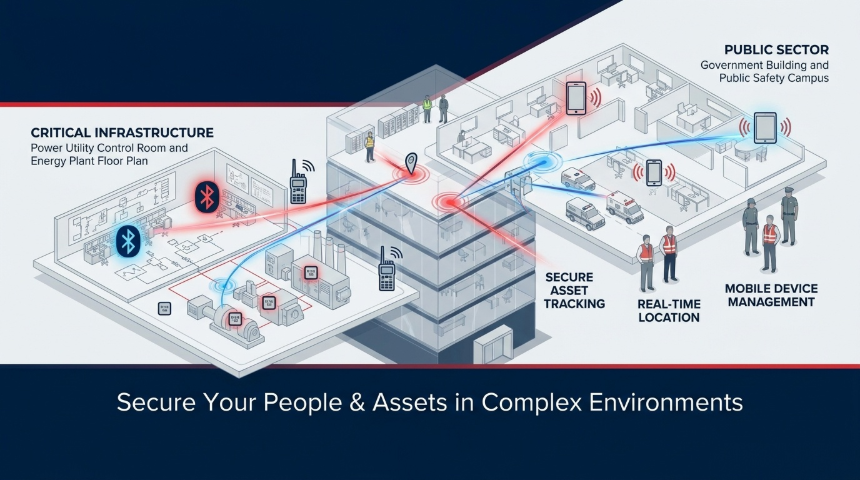
indoor_pos_hero_banner


1. Introduction: What is Indoor Positioning?

While Global Positioning System (GPS) technology revolutionized outdoor tracking and navigation, satellite signals struggle to penetrate concrete walls, steel reinforcement, and multi-story indoor structures. Indoor Positioning Systems solve this fundamental blind spot.

An Indoor Positioning System continuously detects proximity signals from mobile endpoints (smartphones, tablets, laptops) or hardware asset tags as they move through a physical facility. By translating these physical location signals into real-time digital context, organizations can establish virtual boundaries ("indoor geofences") around specific rooms, operating suites, control centres, or hazard zones.


2. What It Does & Why Indoor Positioning Matters

As employees, contractors, and assets move through complex indoor environments such as utility power plants, government campuses, hospital wards, or manufacturing floors, their surrounding operational risk constantly changes.
 
Static security controls fail to adapt to physical transitions inside a building. Leaving unmonitored mobile devices active in restricted indoor zones creates severe exposure to data theft, regulatory non-compliance, and safety incidents.
 
Core Operational & Security Benefits:
 
  • Cybersecurity & Classified Data Protection: Automatically restrict camera capabilities, lock a device, or containerise sensitive applications when an endpoint enters a confidential indoor room or SCADA control centre.
  • Lone Worker Safety & EHS Protection: Trigger automated welfare check-ins, fall detection, and emergency headcount alerts when workers enter hazardous or isolated plant areas.
  • Business Efficiency & Cost Reduction: Eliminate manual asset searches by tracking high-value equipment in real time, streamlining indoor workflows, and removing human error from policy enforcement.
  • Audit & Regulatory Compliance: Maintain tamper-proof, timestamped compliance logs showing exact policy enforcement across indoor risk zones to satisfy NERC CIP, NIS2, PIPEDA, and HIPAA mandates.

3. Key Terms in Indoor Positioning & Context Security

Below is a quick reference guide to the core concepts behind indoor positioning and context-aware endpoint automation:

Term Definition

RTLS (Real-Time Location System)

Technology used to automatically identify and track the physical location of objects or people inside facilities in real time.

BLE Beacons & Tags

Low-power Bluetooth hardware transmitters that broadcast location signals for indoor positioning and asset tracking.

Indoor Geofence

A virtual boundary around a physical indoor room, floor, or zone that triggers automated actions upon entry or exit.

Context Engine

The processing system that evaluates location signals, network trust, and time to determine appropriate policy actions.

Zero-Touch Enforcement

Automated security controls that activate instantly on a device without requiring user or administrator intervention.

MDM / UEM Integration

Bi-directional API connection with platforms like Microsoft Intune, BlackBerry UEM, Ivanti, Samsung Knox, and Jamf to apply device policies.

Risk Zone

A designated physical indoor area (e.g., server vault, operating room, SCADA room) requiring elevated security controls.

Data Containerization

An encrypted area on a mobile device that isolates enterprise applications and data from personal storage.

Lone Worker Monitoring

Automated safety tracking that monitors worker movement and triggers panic/welfare workflows in hazardous indoor zones.

Audit Defensibility

An organization’s ability to provide timestamped proof that security controls were properly applied in specific locations.


4. Architecture Overview

The Fluid Mobility platform bridges physical indoor location detection with automated endpoint policy orchestration.
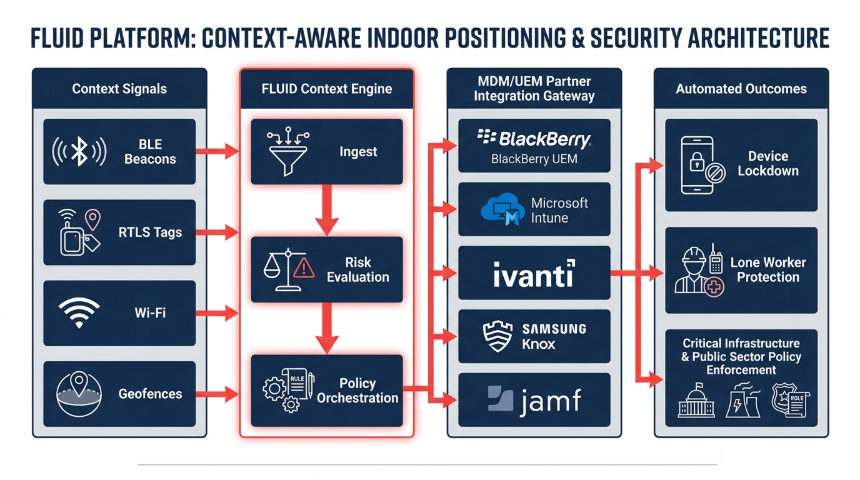
indoor_pos_arch

The Four Core Architectural Layers:

  1. Context Signals Layer: Ingests real-time signals from indoor BLE beacons, RTLS tags, local Wi-Fi access points, and indoor geofenced zones.

  2. Context Engine Layer: Normalizes location telemetry, evaluates real-time risk parameters, and processes rules-based decision logic.

  3. Integration Gateway Layer: Transmits instant policy execution commands via secure APIs to enterprise MDM/UEM platforms and physical access control systems.

  4. Automated Outcomes Layer: Enforces zero-touch device locking, feature restriction (camera/USB), lone worker alerts, dynamic data containerization, and audit logging.

5. How It Works & Interacts with Your Existing Tech Stack

Indoor positioning does not replace your existing enterprise software it makes your infrastructure location-aware.
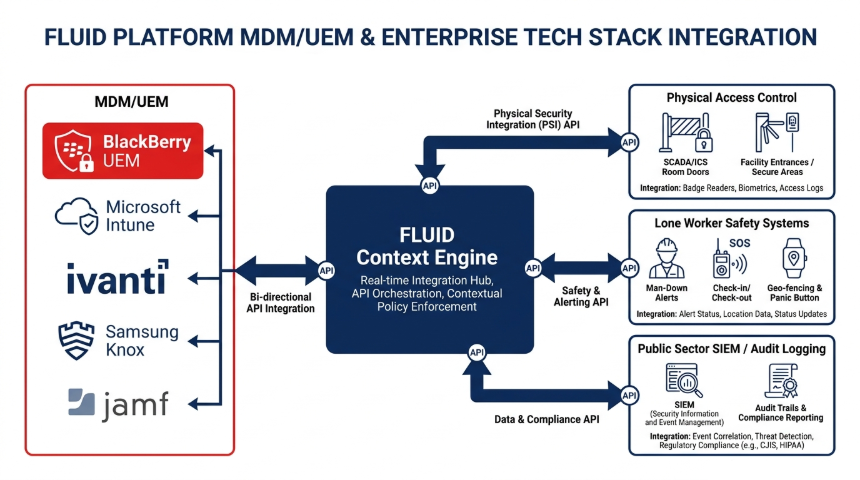
indoor_pos_tech_stack

Ecosystem Interoperability:

  • Enterprise MDM / UEM Integration: Fluid Mobility integrates via bi-directional APIs with major endpoint management platforms including Microsoft Intune, BlackBerry UEM, Ivanti, Samsung Knox, and Jamf. Your MDM remains the enforcement agent while Fluid acts as the location intelligence brain.

  • SCADA / ICS & Physical Access Control: Align mobile device permissions with physical door badge scans or RTLS room entry in critical infrastructure facilities.

  • Lone Worker & EHS Platforms: Dispatch immediate alerts with exact room/floor coordinates to safety teams when a worker triggers a man-down alert.

  • SIEM & Compliance Analytics: Export location-stamped security logs directly into enterprise SIEMs for regulatory reporting

6. Integrating Indoor Positioning into Existing Infrastructure

Deploying context-aware indoor positioning does not require a complete overhaul of your existing physical or digital infrastructure.

Depending on your organization's specific operational requirements and accuracy needs, the platform scales flexibly across your network environment:

  • Leveraging Existing Wi-Fi Infrastructure: Depending on the organization's needs, existing Wi-Fi networks can be utilized for indoor positioning to provide baseline facility coverage and zone detection without requiring immediate hardware additions.

  • Precision Upgrades with BLE & RFID Tags: If a higher level of accuracy is needed such as tracking high-value medical assets, locating equipment in dense industrial facilities, or enforcing room-level device security, BLE tags and RFID tags can give a more precise location.

  • Zero-Touch User Experience: Policy enforcement occurs automatically in the background via secure MDM/UEM APIs, removing the need for employees to manually ajust settings.

  • Air-Gapped & Sovereign Support: Fully supports on-premise and sovereign cloud options for sensitive public sector and critical infrastructure environments.

7. Real-World Use Case: Automated Indoor Security & Safety Workflow

Workflow Example: Restricted Utility Control Room or High-Security Facility Entry
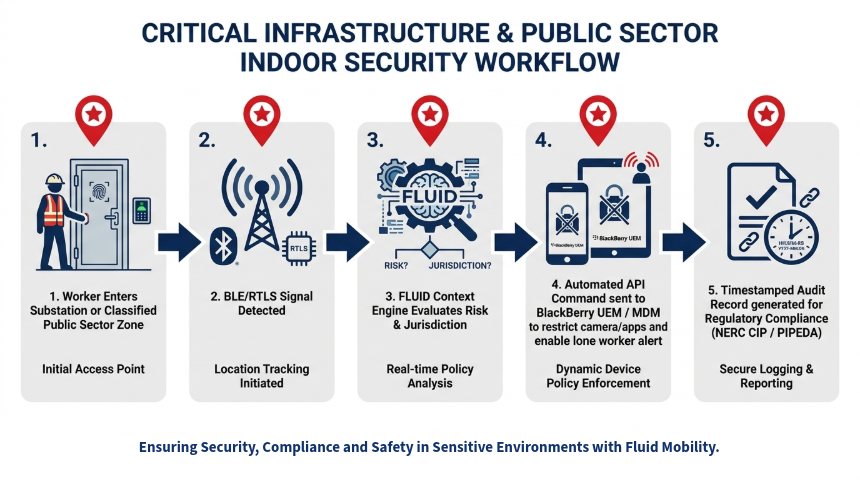
indoor_pos_use_case_workflow

Step 1: Zone Entry — An employee or contractor carrying a managed mobile device enters a designated indoor area (e.g. utility control room, server vault, or restricted operational floor).
Step 2: Signal Detection — Nearby Wi-Fi access points or strategically placed BLE/RTLS beacons detect the device's signal proximity as it crosses into the defined room or floor zone.
Step 3: Real-Time Context Evaluation — The Fluid Context Engine evaluates location telemetry alongside time of day, user authorization role, and zone security requirements.
Step 4: Automated Policy Action — The Fluid Context Engine evaluates location telemetry alongside time of day, user authorization role, and zone security requirements.
Step 5: Compliance Logging — The location detection and policy changes are recorded with exact timestamps to maintain an auditable compliance log.

8. Industry Vertical Value Matrix

Indoor positioning delivers measurable security, safety, and ROI across key commercial and public sectors:

Industry Vertical
Primary Challenges & Risk Factors
Indoor Positioning Solution
Strategic ROI & Impact
Critical Infrastructure (Utilities & Energy)
SCADA room physical security, NERC CIP compliance, lone worker safety in isolated plants.
Real-time RTLS worker safety tracking; zero-touch camera and hardware blocking in control rooms.
Reduced lost-time incidents, 100% auditable NERC CIP compliance, protected critical assets.
Public Sector & Government
Classified document exposure, unauthorized recording in secure buildings, strict compliance mandates.
Automated room-level device lockdown via MDM/UEM integrations upon entering classified zones.
Elimination of data leakage risks, full audit defensibility, seamless sovereign control.
Healthcare & Long-Term Care
Patient record privacy (HIPAA/PIPEDA), medical equipment loss, nurse safety in wards.
Room-level data containerization; RTLS asset tracking for high-value wheelchairs and telemetry units.
Rapid asset retrieval, zero patient record exposure, improved staff safety response.
Manufacturing & Industrial
Heavy equipment hazards, restricted area entry, inventory tracking bottlenecks.
Indoor geofence safety zones with automated hazard alerts and lone worker fall detection.
Lower insurance premiums, reduced workplace accidents, optimized production throughput.
Fleet & Logistics Hubs
Cargo theft in distribution hubs, manual inventory audits, worker safety.
Real-time indoor positioning for high-value cargo and automated facility policy adjustments.
Faster warehouse throughput, reduced inventory loss, eliminated manual logging errors.


9. Frequently Asked Questions (FAQ)

  1. How does indoor positioning differ from traditional GPS?

    GPS relies on satellite signals that cannot penetrate concrete walls, steel structures, or multi-story buildings. Indoor positioning uses local signal networks such as Bluetooth Low Energy (BLE) beacons, RTLS tags, and local Wi-Fi to pinpoint endpoints inside facilities down to specific rooms or sub-meter zones.

  2. Does indoor positioning require replacing our current MDM/UEM solution?

    No. Fluid Mobility integrates directly with your existing MDM/UEM software (including Microsoft Intune, BlackBerry UEM, Ivanti, Samsung Knox, and Jamf). Fluid acts as the location intelligence engine, directing your MDM to adjust policies dynamically.

  3. How does indoor positioning improve lone worker safety?

    By mapping worker location across indoor floors and rooms where GPS fails, the system can detect when a worker enters a hazardous area or suffers a fall. It automatically dispatches alerts with exact indoor coordinates to safety response teams.

  4. Can indoor security policies activate automatically without employee input?

    Yes. Fluid Mobility provides zero-touch enforcement, When an endpoint enters an indoor risk zone, policy adjustments occur automatically in the background without requiring user interaction.

  5. Can the platform be deployed on-premise for high-security or critical infrastructure sites?

    Yes. Fluid Mobility supports on-premise and sovereign deployment models, ensuring location telemetry and security management remain entirely within your organization's physical or controlled network infrastructure

Encouraging visitors to take a specific action

Lorem ipsum dolor sit amet, consectetur adipiscing elit. Sed sit nunc, proin eget scelerisque a, blandit nunc.