Our Core Capabilities
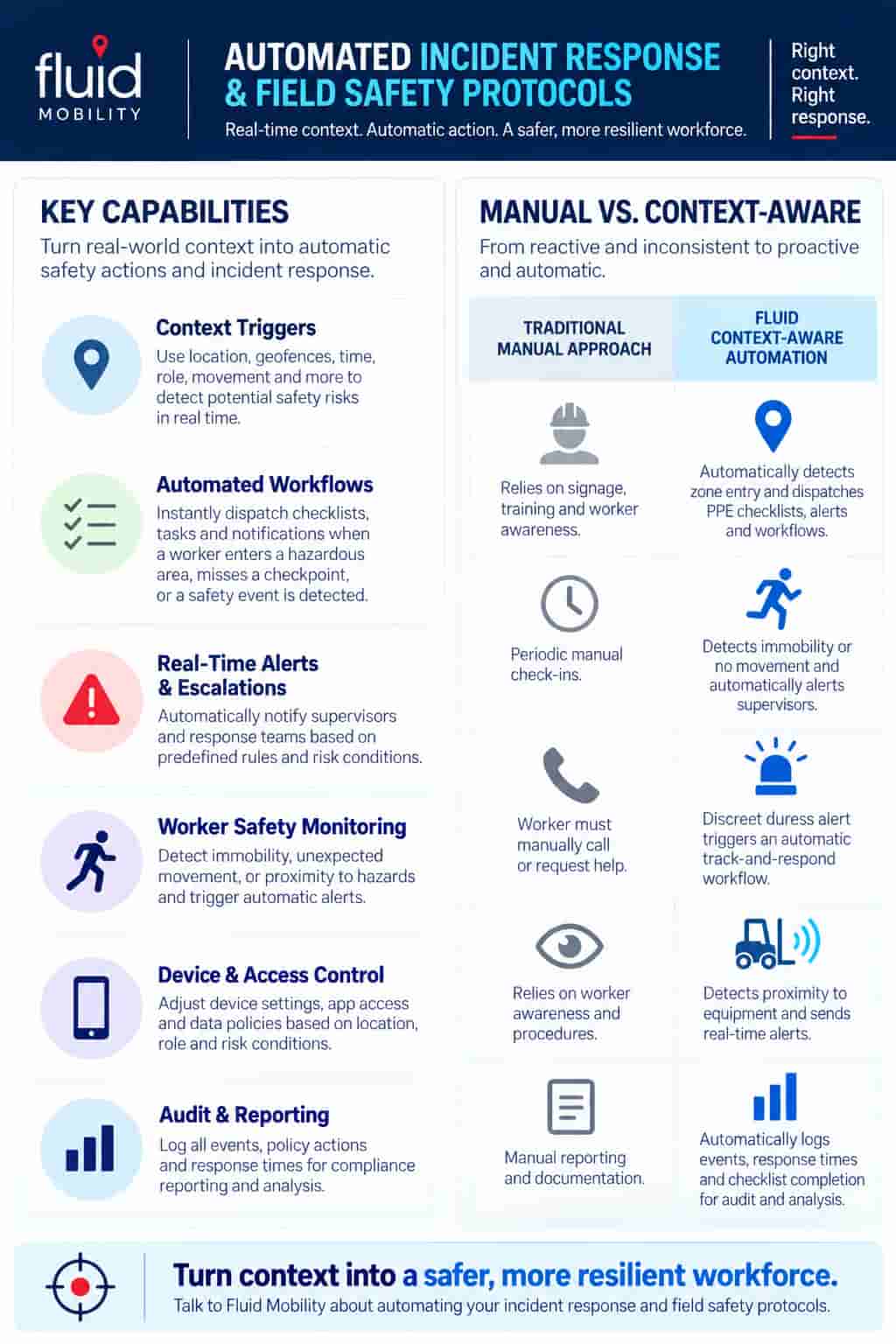
Automated Incident Response & Field Safety Protocols enable organizations to proactively detect safety risks, automate emergency response workflows, and protect field workers and critical assets. By combining indoor Real-Time Location Systems (RTLS), GPS geofencing, Bluetooth Low Energy (BLE), and context-aware automation, Fluid Mobility's FLUID platform detects incident triggers based on worker location, movement, inactivity, restricted-zone entry, and asset activity. When predefined conditions are met, FLUID automatically initiates safety alerts, dispatches incident response workflows, escalates emergencies to designated personnel, and provides location intelligence to support coordinated response efforts. This helps organizations reduce incident response times, improve lone-worker safety, protect critical assets, and strengthen operational resilience while minimizing reliance on manual intervention.
Context-Aware Worker Safety
Continuously monitors worker location and orientation through their device, powered by GPS, Wi-Fi and Bluetooth Low Energy (BLE). The FLUID platform automatically detects context-based safety triggers to detect safety events and action safety workflows accordingly.
MDM / EMM Integration
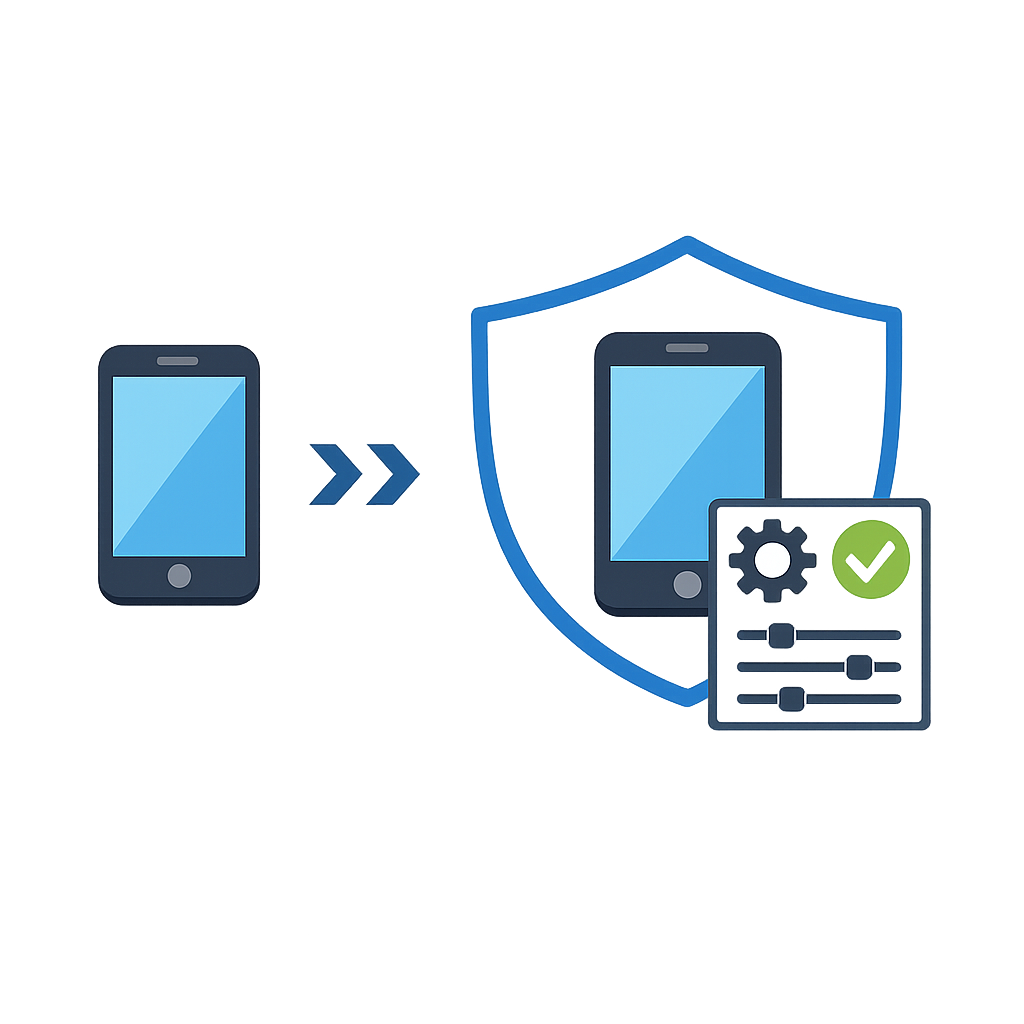
Event-triggered safety workflows integrate directly with leading enterprise MDM / EMM platforms. Automate check-in and safety workflows by location and task, enable duress alerts, and dispatch response personnel to keep staff safe.
Automated Documentation
Real-world context triggers automatically dispatch digital safety checklists, inspection forms, incident reports, and more. audit documentation by automatically recording context-triggered workflows, safety incidents, policy enforcement actions, timestamps, user activity, and task completion records.
How Fluid Mobility Automates High-Security Zone Protocols
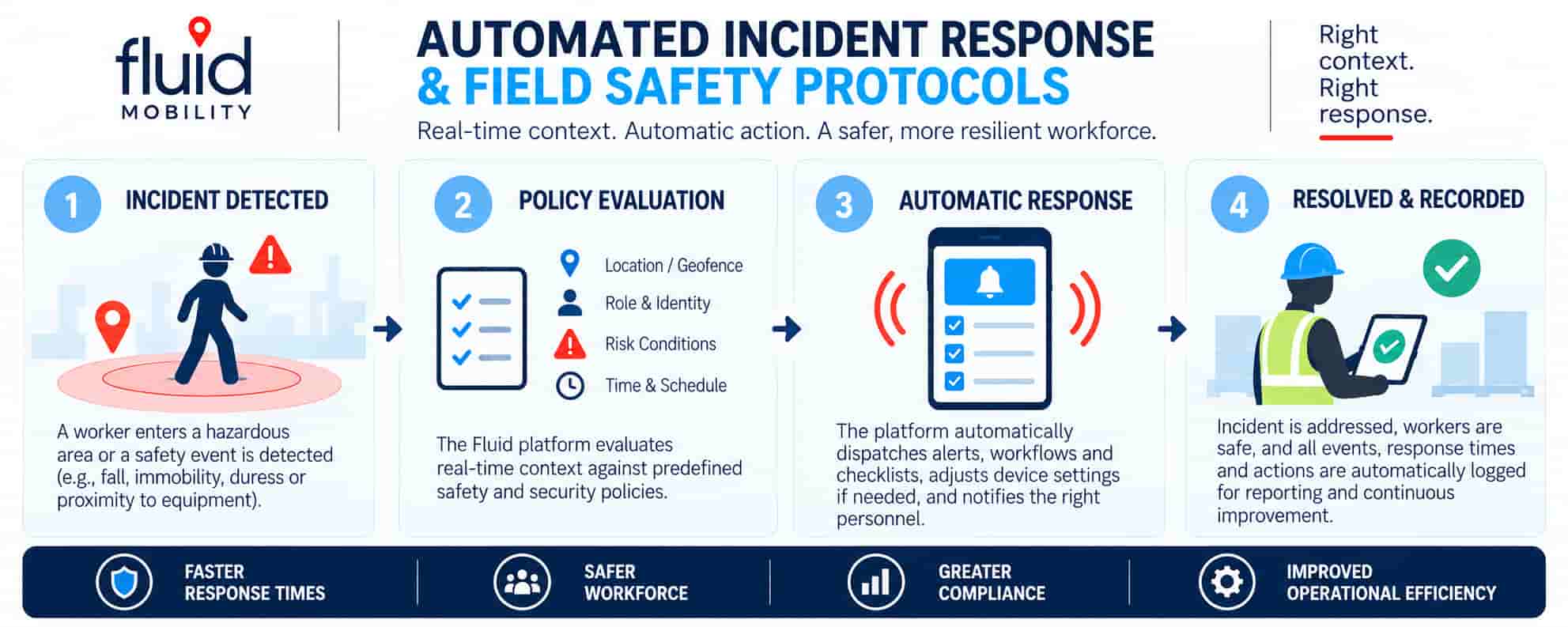
When a worker enters a hazardous zone, triggers a duress alert, or exhibits unexpected movement or prolonged inactivity, Fluid Mobility's context-aware engine detects the event using indoor RTLS, BLE, or outdoor GPS geofencing. The FLUID platform evaluates contextual data - including worker location, role, movement, and operational conditions - to automatically initiate incident response workflows, dispatch safety alerts, notify designated personnel, and deliver digital safety checklists without requiring manual intervention.
-
Accelerates incident detection and response by automatically triggering safety alerts, escalating incidents, and providing real-time worker location intelligence to response teams.
-
Improves field safety and procedural compliance by dispatching context-specific safety checklists, inspections, and emergency response workflows based on worker location, role, and operational conditions.
-
Strengthens accountability and audit readiness by digitally documenting safety incidents, workflow execution, task completion, timestamps, and response activities to support reporting and compliance reviews.
Context Triggers & Automated Actions
|
Context Signal / Technology |
Trigger Condition |
Automated Action |
Safety & Security Outcome |
|---|---|---|---|
|
Indoor RTLS / BLE Beacons |
Worker enters a hazardous or restricted work zone. |
Dispatches digital safety checklists, hazard notifications, and required safety protocols to the worker's mobile device. |
Proactive Hazard Prevention: Reinforces safety procedures and reduces human error. |
|
GPS / Geofence Boundary |
Worker enters or exits a designated high-risk site or operational perimeter. |
Initiates location-specific safety workflows, check-in requirements, and supervisor notifications. |
Improved Site Safety: Strengthens worker accountability and situational awareness. |
|
Movement / Inactivity Detection |
Worker remains stationary beyond a predefined threshold or exhibits unexpected movement patterns. |
Initiates a worker check-in and escalates unanswered alerts to designated response personnel. |
Lone-Worker Protection: Enables earlier detection and response to potential emergencies. |
|
BLE Duress Button / SOS Signal |
Worker activates an emergency alert or discreet duress button. |
Dispatches emergency notifications, shares available worker location data, and initiates incident response workflows. |
Rapid Emergency Response: Improves response coordination and worker protection. |
|
Asset RTLS / Geofencing |
Critical equipment moves outside an authorized area or enters a hazardous zone. |
Alerts designated personnel, logs asset movement, and initiates an asset recovery or inspection workflow. |
Asset Protection: Reduces unauthorized movement, equipment losses, and operational disruption. |
|
Time / Role / Task Context |
Worker begins a hazardous task, enters a scheduled shift, or reaches an inspection checkpoint. |
Assigns required digital checklists, inspections, safety acknowledgments, and documentation workflows. |
Audit Readiness & Procedural Compliance: Improves documentation accuracy, accountability, and operational consistency. |
Frequently Asked Questions
What is automated incident response and field safety management?
Automated incident response and field safety management uses real-time data, location intelligence, and predefined triggers to detect potential workplace hazards and initiate safety workflows without relying entirely on manual reporting.
Fluid Mobility's FLUID platform combines GPS geofencing, indoor Real-Time Location Systems (RTLS), Bluetooth Low Energy (BLE), and context-aware automation to trigger emergency alerts, worker safety checklists, incident escalation procedures, and digital documentation. This helps organizations improve workplace safety, reduce response delays, and strengthen operational accountability.
How does Fluid Mobility automate incident detection and emergency response?
Fluid Mobility automates incident detection and emergency response by monitoring contextual signals such as worker location, movement, inactivity, time, and emergency alerts.
When a predefined safety condition is detected, the FLUID platform can initiate an automated response workflow, notify designated personnel, provide available worker location information, and document incident activity. These capabilities help safety teams identify potential emergencies earlier and coordinate responses more efficiently.
What are context triggers, and how are they used to automate workplace safety protocols?
Context triggers are predefined conditions that initiate automated actions when changes occur in a worker's location, activity, environment, or operational status.
Fluid Mobility uses context triggers such as geofence entry, BLE proximity detection, worker inactivity, SOS activation, time-based schedules, and user roles to automate safety notifications, inspections, incident escalation, and emergency response procedures.
By connecting real-world conditions with digital workflows, organizations can reduce manual intervention and improve safety protocol consistency.
How can geofencing improve worker safety in hazardous or restricted areas?
Geofences create virtual boundaries around hazardous work zones, restricted facilities, and operational sites.
When a worker's location-enabled device enters or exits a defined geofence, Fluid Mobility can automatically trigger hazard notifications, dispatch safety checklists, initiate check-in procedures, or alert supervisors. These location-based safety workflows help reinforce site protocols and improve awareness of potential hazards.
Can we set different security policies for overlapping zones?
Yes. Fluid supports multi-layered polygon geofences and indoor RTLS zones, enabling you to apply general policies for an entire facility and heightened restrictions for inner vaults or cleanrooms.
What is the difference between GPS geofencing and indoor RTLS for worker safety? (INSERT LINK)
GPS geofencing uses satellite-based location data to monitor workers and assets across outdoor areas, while indoor RTLS uses technologies such as BLE and Wi-Fi to provide location visibility inside buildings and facilities.
Fluid Mobility can combine these technologies to support location-triggered safety protocols across indoor and outdoor environments <INSERT GPS VS RTLS LINK>. GPS geofencing is useful for field operations, remote worksites, and large outdoor perimeters, while indoor RTLS supports worker monitoring, hazardous-zone alerts, and emergency response coordination within facilities.
How can organizations automate lone-worker safety monitoring and emergency check-ins? (INSERT LINK)
Organizations can automate lone-worker safety monitoring by combining scheduled check-ins, location tracking, inactivity detection, and predefined emergency escalation workflows (INSERT LONE WORKER LINK).
Fluid Mobility can use time, location, and worker activity triggers to initiate check-in requests, identify missed responses, notify supervisors, and share available location information with response personnel. This reduces dependence on manual monitoring and helps organizations respond to potential lone-worker emergencies.
Can Fluid Mobility detect worker inactivity, falls, or man-down incidents?
Fluid Mobility can support automated inactivity and man-down detection when integrated with compatible mobile devices, wearable sensors, or RTLS technologies capable of detecting the relevant conditions.
For example, prolonged inactivity or a fall-detection alert can initiate a worker check-in, followed by an emergency escalation if the worker does not respond. The FLUID platform can then notify designated personnel and provide available location information to support incident response.
Important distinction: Inactivity alone does not confirm an injury, and fall detection requires suitable sensor capabilities. Detection thresholds and escalation procedures should be configured to minimize false alarms.
How do BLE panic buttons and mobile SOS alerts improve emergency response? (INSERT LINK)
Bluetooth Low Energy (BLE) panic buttons and mobile SOS alerts allow workers to discreetly request assistance during emergencies, threats, or hazardous situations.
When an SOS signal is received, Fluid Mobility can trigger predefined emergency response workflows, notify supervisors or security personnel, and share available worker location data (INSERT MARYLAND LINK). These capabilities support faster incident escalation, particularly for lone workers, healthcare personnel, security teams, and employees operating in isolated or high-risk environments.
Can safety checklists and inspections be automatically triggered by location, time, or worker role?
es. Digital safety checklists and inspections can be automatically initiated using location, time, worker role, and other operational context triggers.
Fluid Mobility can dispatch pre-entry safety checklists when workers enter hazardous zones, initiate equipment inspections at designated checkpoints, and assign safety procedures based on employee responsibilities or scheduled activities. These automated workflows help reduce missed inspections, improve procedural consistency, and minimize manual administrative work.
How does Fluid Mobility support digital incident reporting and safety audit documentation?
Fluid Mobility supports digital incident reporting and safety audit documentation by connecting context-triggered events with automated workflows, reporting systems, and electronic records.
Depending on system configuration, FLUID can capture timestamps, location events, workflow initiation, user acknowledgments, incident escalations, and task completion information. These records help organizations improve accountability, investigate incidents, document corrective actions, and prepare for workplace safety audits.
Digital incident management and inspection systems commonly connect reporting, investigations, corrective actions, and audit records to improve safety oversight.
How can automated safety workflows help organizations meet occupational health and safety requirements?
Automated safety workflows help organizations support occupational health and safety requirements by improving the consistency, documentation, and traceability of safety procedures.
Fluid Mobility can initiate required inspections, dispatch safety checklists, record worker acknowledgments, and document incident response activities based on predefined context triggers. This helps organizations demonstrate that established safety procedures were communicated and followed.
How can MDM/UEM integration improve automated field safety operations?
When integrated with Fluid Mobility, MDM/UEM can support context-aware device policies and application availability based on worker location, role, time, and operational conditions. This helps organizations maintain reliable digital safety workflows, reinforce site-specific protocols, and reduce manual device administration.
MDM/UEM primarily manages devices and applications, while the FLUID platform provides context-aware workflow orchestration through supported integrations.
Can RTLS and geofencing improve both worker safety and critical asset protection?
Yes. RTLS and geofencing can support worker safety and asset protection by monitoring the location, movement, and proximity of personnel and equipment.
Fluid Mobility can use location-based triggers to alert supervisors when equipment moves outside designated areas, initiate asset inspection workflows, and notify workers when they enter hazardous operating zones. These capabilities help organizations reduce unauthorized asset movement, improve equipment visibility, and strengthen site safety.
Where supported by appropriate positioning infrastructure, proximity alerts can also help identify potentially unsafe interactions between workers and mobile equipment.
Our Recent Insights
Explore how context-aware security and mobile policy automation are reshaping high-security environments across critical industries.
10/13/2026
Automated RTLS Asset Tracking for High-Value Equipment
Automated RTLS Asset Tracking for High-Value Equipment
10/13/2026
Automated Incident Response for Field & Lone Workers
Automated incident response uses real-time location, geofencing, connected devices,and predefined...
09/16/2026
Enhancing Security, Safety, and Efficiency with Context-Aware Automation
Every day, things change. A worker starts a shift. A device enters a secure facility. Someone...
09/09/2026
What Is Context-Aware Security? And Why Does Context Matter?
Security knows who you are. But does it know what's happening around you? Security has...