Context-Aware Mobile Security for Insurance Claims Teams
Insurance claims professionals work across home offices, customer properties, remote inspection sites, and disaster zones. Each environment presents different risks to employee safety and the sensitive insurance information accessed through mobile devices.
Context-aware mobile security helps insurers adapt device protections and worker safety workflows to changing locations, operational conditions, and security requirements.
By combining geofencing, automated safety workflows, and mobile device management (MDM/UEM) integrations, insurance companies can better protect field adjusters and sensitive claims data.
Key Takeaways
- Claims data protection: Location-aware security can trigger supported mobile device and application restrictions when employees enter designated risk environments.
- Worker safety: Automated check-ins, SOS alerts, and escalation workflows can help protect adjusters working alone or in hazardous locations.
- Enterprise integration: Context-aware automation works alongside compatible MDM/UEM platforms and existing security procedures. Available controls depend on device capabilities, connectivity, and system configuration.
What Is Context-Aware Mobile Security?
Context-aware mobile security is an approach to enterprise data protection that uses information such as device location, user role, time, and operational conditions to initiate predefined security actions.
Traditional mobile device management establishes baseline protections for corporate devices. Context-aware automation adds the ability to evaluate changing circumstances and trigger appropriate workflows.
Fluid Mobility's FLUID platform connects location intelligence, geofencing, and compatible enterprise systems to help organizations automate these responses.
For example, a managed device entering a designated high-risk location could trigger a supported application restriction, additional authentication requirement, or security notification, depending on the integrated systems.
The objective is straightforward: apply appropriate security controls when and where they are needed.
What Mobile Security Risks Do Insurance Claims Teams Face?
Insurance claims professionals routinely access sensitive customer and business information outside traditional office environments.
This may include:
- Policyholder names, addresses, and contact details.
- Insurance claims records and financial documentation.
- Property photographs and damage assessments.
- Confidential policy information and supporting documents.
Mobile devices carrying or accessing this information may be exposed to loss, theft, unauthorized access, insecure networks, or physical compromise.
The risks also change with the working environment.
A field adjuster accessing claims records from a home office faces different circumstances from an adjuster inspecting a damaged property or working in a disaster-affected area.
For insurers, effective mobile security requires more than verifying employee identity. It also requires understanding the conditions under which sensitive information is accessed.
Protecting Field Adjusters and Claims Data: A Dual-Layer Approach
Insurance field operations present two interconnected challenges: protecting employees and safeguarding the information they access.
Fluid Mobility's FLUID platform supports a dual-layer approach to mobile workforce safety and security.
Layer 1 — Automated Worker Safety
Location-aware safety workflows can help insurance companies:
- Trigger arrival check-ins at scheduled property inspections.
- Initiate additional safety confirmations for remote or hazardous assignments.
- Support emergency requests through compatible mobile or BLE SOS alerts.
- Escalate missed check-ins to designated supervisors.
- Provide available worker location information during incident response.
These capabilities help organizations coordinate assistance without relying exclusively on manual communications.
Layer 2 — Context-Aware Claims Data Security
Through geofencing and compatible MDM/UEM integrations, insurers can:
- Maintain baseline security policies across managed devices.
- Identify when devices enter or exit designated security zones.
- Trigger supported application, device, or data access restrictions.
- Initiate predefined security notifications.
- Record relevant security events and workflow actions.
Together, these layers help insurers protect both their field personnel and the sensitive claims information they handle.
Field Adjuster Risk Matrix: One Device, Four Environments
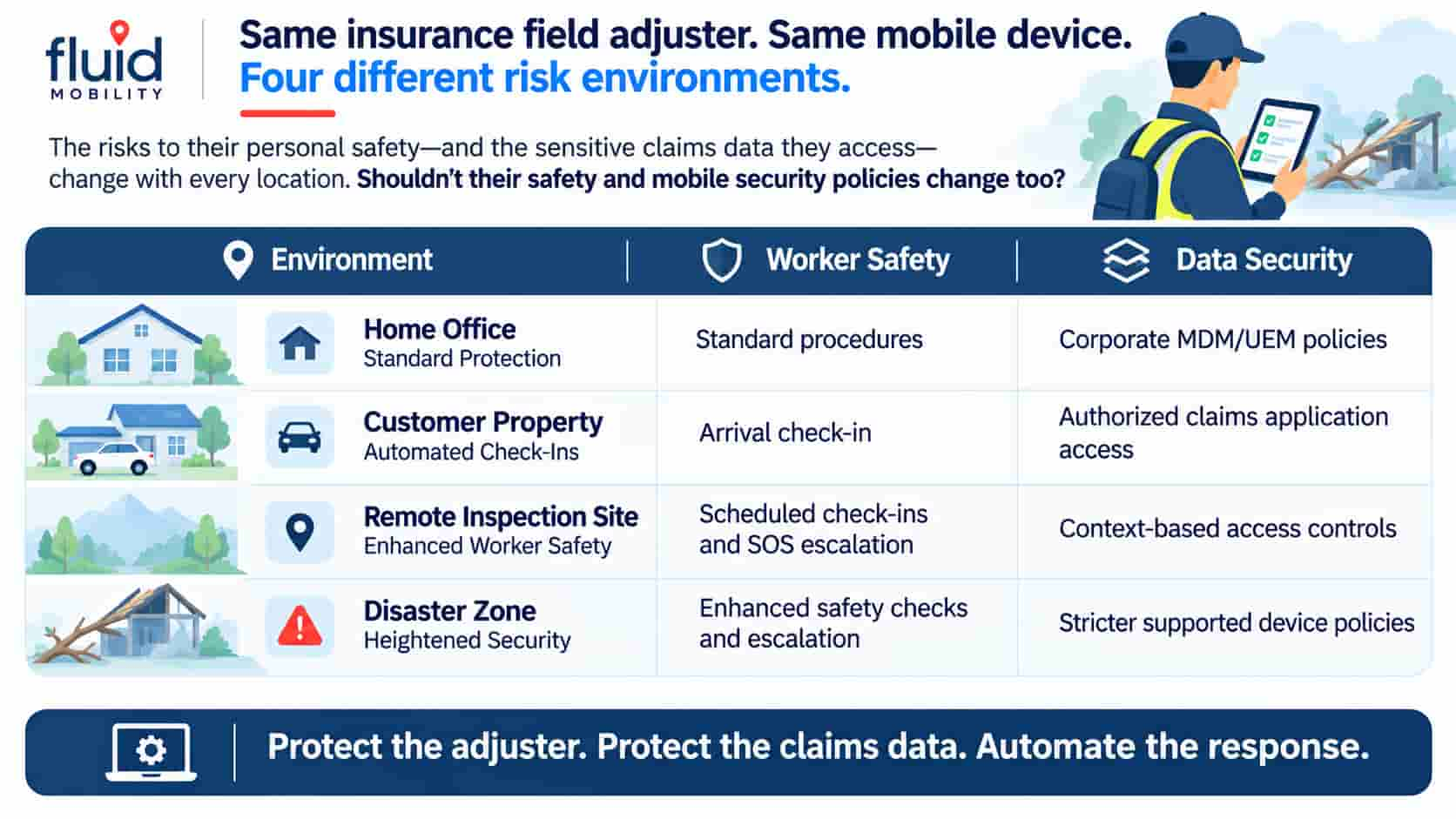
Consider an insurance field adjuster moving between four environments during a typical assignment.
Although the employee and mobile device remain the same, the operational risks change.
| Work Environment | Worker Safety Policy | Mobile Data Security Policy |
|---|---|---|
| Home Office | Standard safety procedures | Corporate MDM/UEM protections |
| Customer Property Visit | Arrival check-in and scheduled confirmation | Authorized claims application access |
| Remote Inspection Site | Scheduled check-ins and SOS escalation | Context-based access controls where supported |
| Disaster or Accident Site | Enhanced safety checks and emergency escalation | Stricter supported device and data protections |
Illustrative deployment: Actual workflows depend on organizational policies, supported integrations, device capabilities, and network connectivity.
At a customer property, entering a designated geofence could prompt the adjuster to confirm arrival.
At a remote inspection site, scheduled check-ins could help supervisors maintain contact with an employee working alone.
At a disaster site, predefined location rules could initiate additional safety procedures and supported mobile security restrictions.
If an adjuster activates an SOS alert or misses a required check-in, FLUID can initiate an escalation workflow and notify designated personnel with available location information.
The principle: Worker safety and data security policies should reflect the risks of the environment, not just the identity of the employee.
How Does Geofencing Trigger Security and Safety Workflows?
Geofencing uses virtual geographic boundaries to detect when compatible devices enter or exit designated locations.
Fluid Mobility connects these location events to predefined rules and automated actions.
A typical deployment follows five steps:
- Detect Context: A managed device enters or exits a configured geofence.
- Evaluate Conditions: FLUID compares the event against relevant location, time, role, and operational rules.
- Trigger Workflows: The platform initiates a configured safety check-in, security notification, or supported MDM/UEM action.
- Notify Responders: Designated personnel receive alerts and relevant available location information when required.
- Record and Report: Configured events, notifications, and response actions are documented for review.
For example, an adjuster entering a disaster recovery zone could receive a safety checklist while a compatible MDM/UEM system applies predefined device restrictions.
Geofencing provides the contextual trigger; the connected safety and security systems perform the configured actions.
Learn more about Fluid Mobility's geofencing capabilities and MDM integration.
Protecting Worker Privacy and Maintaining Reliable Responses
Location-aware worker safety and mobile security programs must balance operational visibility with employee privacy.
Organizations should establish clear policies defining when location information is collected, who can access it, and how long records are retained.
Where supported, location monitoring can be limited to working hours, designated assignments, or specific safety events.
Insurers must also account for technical limitations.
Connectivity: GPS accuracy, mobile coverage, and device availability can affect location reporting and notification delivery.
Check-in escalation: A missed check-in does not necessarily indicate an emergency. Response procedures should include verification and appropriate escalation.
MDM/UEM compatibility: Available restrictions vary by operating system, device management configuration, and integration capabilities.
Emergency response: Automated notifications support established safety procedures but do not replace trained personnel or emergency services.
Effective deployments require clear rules, appropriate access controls, tested workflows, and defined human responsibilities.
Supporting Insurance Field Teams with Fluid Mobility
Insurance companies need mobile security strategies that reflect the environments in which claims professionals operate.
Fluid Mobility's FLUID platform combines location intelligence, configurable worker safety workflows, and enterprise security integrations to help organizations respond to changing risks.
For field adjusters, this means supporting automated check-ins, emergency escalation, and context-aware mobile data protection within a coordinated operational framework.
Protect the adjuster. Protect the claims data. Automate the response.
Explore Fluid Mobility's automated field worker safety and incident response solution.
Frequently Asked Questions
Can insurance companies automatically change mobile security policies based on location?
Yes. Insurance companies can use compatible geofencing and MDM/UEM integrations to trigger supported mobile device, application, or data security policies when managed devices enter or exit predefined locations. Available controls depend on device operating systems, management configurations, and enterprise integrations.
How can insurers protect lone field adjusters working at remote or hazardous locations?
Insurers can use GPS geofencing, scheduled check-ins, mobile or BLE SOS alerts, and automated escalation workflows to support lone-worker safety. These systems can notify designated supervisors when assistance may be required and provide available location information to support a coordinated response.
Does context-aware mobile security replace traditional MDM/UEM systems?
No. Context-aware mobile security complements existing MDM/UEM systems. Fluid Mobility's FLUID platform evaluates contextual information and initiates configured workflows, while compatible MDM/UEM platforms apply supported device and application security controls.